SANE via Media Suite
Work with sensitive audiovisual collections in a secure analysis environment — starting from your selection in the Media Suite.
Status: beta. SANE access via the Media Suite is currently offered on a pilot basis for CLARIAH researchers working with NISV (Netherlands Institute for Sound and Vision) collections. Details on this page will evolve as the service matures.
What is SANE?
SANE — the Secure Analysis Environment — is a hosted environment maintained by SURF that lets researchers analyse sensitive data without the data ever leaving the protected environment. It implements the Five Safes framework and is used by multiple Dutch research infrastructures.
For CLARIAH researchers, SANE makes it possible to work with NISV collections that cannot be downloaded or taken home: you bring your code and questions into the environment, the data stays inside.
Who is this for?
This page is aimed at researchers who want to analyse NISV audiovisual data that is not openly available. Through the Media Suite we can currently facilitate access to NISV collections only. For other CLARIAH collections, SANE is not yet a routed option — we’ll update this page as that changes.
How it works: from selection to analysis
The workflow combines two steps that may already be familiar (using the Media Suite to explore and select data) with SANE-specific steps to move that selection into a secure environment.
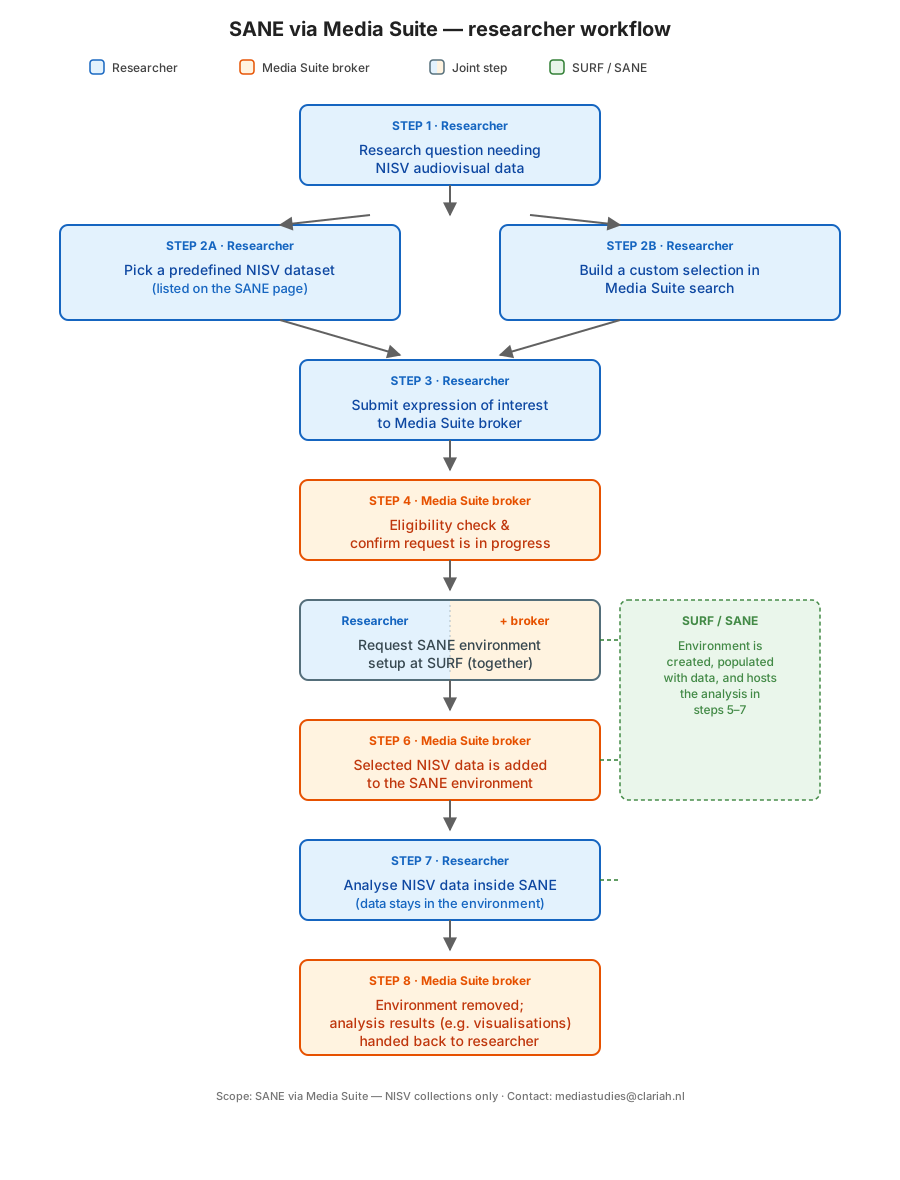
1. Select a data set or build one in the Media Suite
Either select a data set that has already been prepared (see below: “What you can analyse”) or start in the Media Suite, where you can search, browse, and curate a selection of NISV items relevant to your research question, and store your “personal dataset” in your workspace. This is also where you document what you want to analyse and why — the selection and motivation feed directly into the access request.
If you are new to the Media Suite, the Community site and its working groups are a good entry point.
2. Submit the access request
Fill in the SANE access request form. The request includes:
- who you are and your affiliation
- the NISV data you want to work with (linked to your Media Suite selection where possible)
- your research motivation and methods
- any software or compute requirements you already know
The request goes to the Media Suite broker, who checks eligibility, confirms receipt, and forwards it to the data provider at NISV.
[TBD: link to the actual request form once finalised]
3. Data provider approval (NISV)
NISV reviews the request and contacts you directly to arrange access. Depending on the collection, this may involve signing a confidentiality or data-use agreement. The Media Suite broker stays in the loop to help things move along.
4. SANE environment setup (happens in parallel)
While the access conversation with NISV is ongoing, SURF and the broker prepare the SANE environment for your project: a secure workspace with a data server, a data provider portal, and the analysis machine you’ll actually work in. Setting up a basic environment takes on the order of 30 minutes once everything is ready to go.
Typical starting configuration for a pilot is a small virtual machine (1 core / 8 GB RAM); larger machines — including higher-memory or GPU options — are available for projects that need them.
5. Analyse
Once NISV has approved access and the environment is live, you log in and work inside SANE. R and Python are available, and additional tooling can be arranged on request. No data leaves the environment — any outputs you want to take out go through a review step with the data provider.
Practical guidance on logging in, installing libraries, and getting data and code in and out will live in a separate “Working in SANE” guide — [TBD: link once published].
6. Close out
At the end of the project we verify with you and with NISV that everything can be wound down, and the environment is removed.
What you can analyse: NISV collections
Through the Media Suite, SANE access is currently scoped to NISV collections. We can facilitate access to these because of our working relationship with Sound and Vision; we do not broker access to other collections via this route.
Besides building your own selection in the Media Suite, you can also request access to one of the default collections listed below. New default collections can be added by dropping an additional markdown file alongside this page.
Wav2vec 2.0 Models — Dutch Archival Broadcast
Self-supervised speech foundation models pre-trained on 55,000 hours of Dutch archival television broadcast data from the NISV collection.
NISV archival television broadcast data — 55,000 hours
Costs
We are not publishing cost or funding details yet while the service is in beta. If cost is a blocker for your planned project, get in touch and we’ll discuss options.
Request access or ask a question
For general questions, email mediastudies@clariah.nl.
Further reading
- SURF SANE documentation — https://www.surf.nl/en/themes/research-infrastructure/sane-secure-environment-for-analysing-sensitive-data/
- ODISSEI SANE page (for context on the shared SANE infrastructure used by the social sciences) — https://odissei-data.nl/facility/secure-analysis-environment-sane/